An abliterated model is an open model with its tendency to refuse edited out of the weights. Running one yourself means no per-token bill, no content filter you don't control, and data that never leaves your machine. It also means you are the one who has to make it fast, keep it up and decide who gets to use it.
This guide is how I did that for an abliterated Qwen3.8-27B on a single rented NVIDIA GB10. The result speaks the OpenAI chat API (chat, thinking mode, tool calling, images, speech-to-text and embeddings), sits behind a name I own, enforces a key, and comes back by itself after the provider stops the machine. Everything is in qwen-abliterated-api, including docs/SELF_HOSTING.md with each step and its check.
What you get
- An endpoint at
https://your-name/v1that any OpenAI client can call.- Decode at about 34 tokens/s on code and 15 on prose, 105 tokens/s in aggregate with 8 clients.
- A deployment you can rebuild on another GPU by changing one address.
- Cost: US$ 0.449 per GPU-hour while it runs, about US$ 0.007 per hour while stopped.
What abliteration changes
Research by Arditi and colleagues in 2024 showed that in many chat models, refusing a request is driven by a single direction in the model's internal activations. Abliteration turns that into a permanent edit:
- Run the model on prompts it refuses and prompts it answers, and record the activations at a chosen layer.
- Take the difference of the two averages. That vector estimates the refusal direction.
- Project the direction out of the weight matrices that write into the residual stream.
- Save the result as an ordinary checkpoint.
No training happens. The checkpoint has the same architecture, tensor shapes and file format as the original, which is why serving one is uneventful: vLLM loads it like any other Qwen of that size, and the same drafter and quantisation options apply.
What does change is trust. An official checkpoint comes from a company with a reputation; an abliterated one usually comes from an individual, and the model card is all the documentation you get. Check the lineage before you download 50 GB:
from huggingface_hub import HfApi

info = HfApi().model_info("Blackfrost-AI/Qwen3.8-27B-ABLITERATED-BF16")
print(info.card_data.base_model, info.sha, info.card_data.license)
The base model should name the official parent (Qwen/Qwen3.8-27B). Pin the revision you tested in your deploy script, because a hub repository can change under the same name. Both the publisher's licence and the base model's licence apply.
Why it starts slow: the arithmetic
A model answers in two phases. Prefill reads the whole prompt in parallel and is limited by compute. Decode then produces one token at a time, and every token requires reading every weight from memory once. That makes decode a bandwidth problem. With 54 GB of BF16 weights and 273 GB/s of memory bandwidth, one token can't take less than 54 / 273 seconds: a ceiling of about 5 tokens per second. I measured 4.4.
Two levers follow from that one formula:
- Read fewer bytes per token. FP8 halves the weights to about 27 GB and raises the ceiling to about 10 tokens/s.
- Get several tokens from each read. With speculative decoding, a small drafter proposes seven tokens and the 27B model verifies all of them in one pass over its weights, keeping the prefix it agrees with.
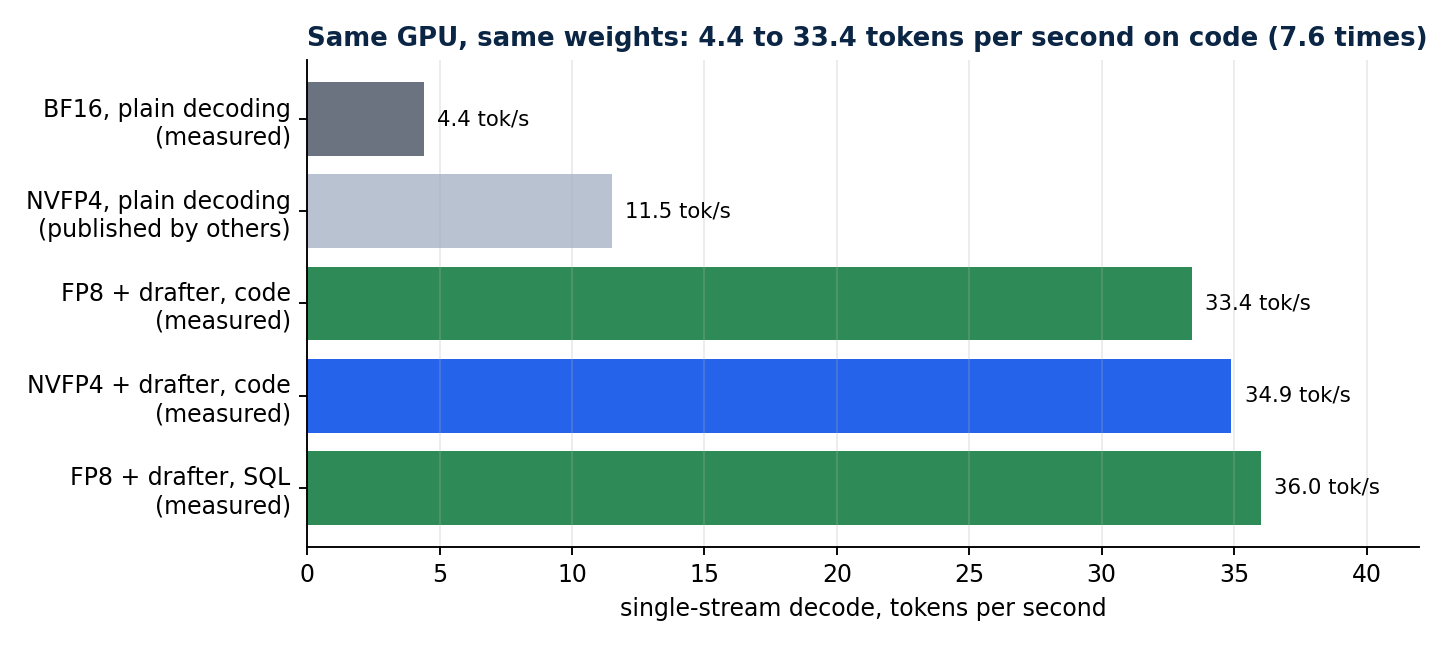 Each bar changes one thing. FP8 plus the drafter reached 33.4 tokens/s on code: 7.6 times the BF16 start, with the same weights.
If you use a different GPU, do the division yourself: bandwidth from the vendor's spec divided by the weight size. A measurement far below it points at configuration; far above it means the test is wrong. The comparison between FP8 and NVFP4, including quality and long context, has its own article: Qwen 27B in FP8 vs NVFP4.
The serving path
A DNS record can't carry a port, and GPU marketplaces map container ports to random high numbers that change every time an instance is recreated. A small edge host with a stable address solves both:
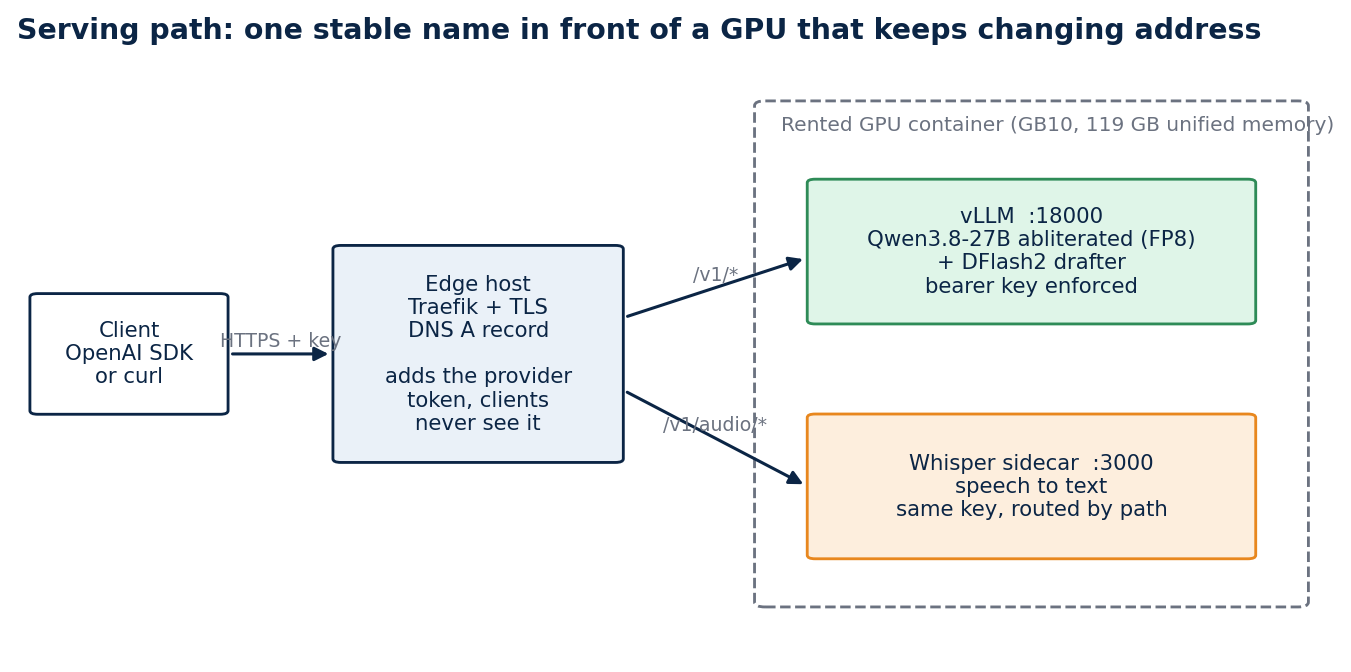 The client calls a name I own. Traefik on the edge host terminates TLS and forwards to whatever address the GPU has today.
client --HTTPS--> Traefik (edge, Let's Encrypt) --> provider's mapped port --> Caddy (instance token) --> vLLM (--api-key)
There are two token layers, and clients hold only one stable key. The provider's own Caddy edge wants an instance token that changes on every recreation; Traefik injects it as a cookie, which leaves the Authorization: Bearer header free for vLLM's --api-key. Streaming stays smooth because the route flushes every millisecond.
What you need
| Item | Notes |
|---|---|
A rented GPU container with sshd |
tuned on an NVIDIA GB10 (119 GB unified memory) on Vast.ai |
| An edge host running Traefik | gives the endpoint a stable HTTPS name |
| DNS API access | the scripts call one DNS provider's API; swap scripts/dns-upsert.sh for yours |
Local bash, ssh, Python 3.10+ and Terraform 1.5+ |
nothing else |
Two provider details save an hour each. Register your deploy key on the provider account, not only on the instance, because Vast rewrites authorized_keys from the account keys on restart. And of the several mapped ports a container lists, only the one mapped to port 22 is SSH; mine was visible only inside the container as VAST_TCP_PORT_22.
Step 1: check the repository locally
git clone https://github.com/LucasRangelSSouza/qwen-abliterated-api
cd qwen-abliterated-api
bash -n scripts/*.sh && python3 -m py_compile tests/*.py && echo ok
terraform -chdir=infra/terraform-vast init -backend=false
terraform -chdir=infra/terraform-vast validate
Nothing has touched a server yet, so this is the cheapest place to find a problem.
Step 2: describe your machines and apply
cd infra/terraform-vast
cp terraform.tfvars.example terraform.tfvars    # git-ignored: addresses, mapped ports, keys, public name
terraform apply
The apply configures vLLM on the GPU, publishes the route on the edge host, upserts the DNS record and runs an acceptance test, in that order. The first run downloads about 56 GB (the 52 GB BF16 checkpoint, the 3.6 GB drafter and 1.6 GB of Whisper) in about ten minutes; vLLM quantises the weights to FP8 as it loads them. The command the script writes is short enough to read:
vllm serve <weights> --served-model-name qwen-abliterated --max-model-len 160000 --max-num-seqs 4 \
  --kv-cache-dtype auto --quantization fp8 --gpu-memory-utilization 0.60 \
  --enable-auto-tool-choice --tool-call-parser qwen3_xml --reasoning-parser qwen3 \
  --speculative-config '{"method":"dflash","model":"<drafter>","num_speculative_tokens":7}'
--kv-cache-dtype auto keeps the KV cache in BF16. An FP8 cache fits more context but silently lost the answer in every prompt above ~25k tokens in my tests. --gpu-memory-utilization 0.60 leaves room for the speech and embedding sidecars on the same GPU.
Step 3: validate from the outside
Validate through the public name, because that is the path your users take:
export BASE_URL=https://qwen.example.com/v1 API_KEY=<your key>
curl -s -o /dev/null -w "%{http_code}\n" "$BASE_URL/models"                                       # expect 401
curl -s -o /dev/null -w "%{http_code}\n" -H "Authorization: Bearer $API_KEY" "$BASE_URL/models"   # expect 200
scripts/smoke-test.sh "${BASE_URL%/v1}" "$API_KEY"
Don't skip the 401. An endpoint that answers 200 without a key looks healthy and is open to anyone.
Then call it the way your applications will:
from openai import OpenAI

client = OpenAI(base_url="https://qwen.example.com/v1", api_key="<your key>")
reply = client.chat.completions.create(
    model="qwen-abliterated", temperature=0, max_tokens=512,
    messages=[{"role": "user", "content": "Write a Python retry decorator with exponential backoff."}],
    extra_body={"chat_template_kwargs": {"enable_thinking": False}},
)
print(reply.choices[0].message.content)
Thinking is on by default. Turning it off makes short answers about twice as fast; when it is on, the reasoning comes back separately in message.reasoning.
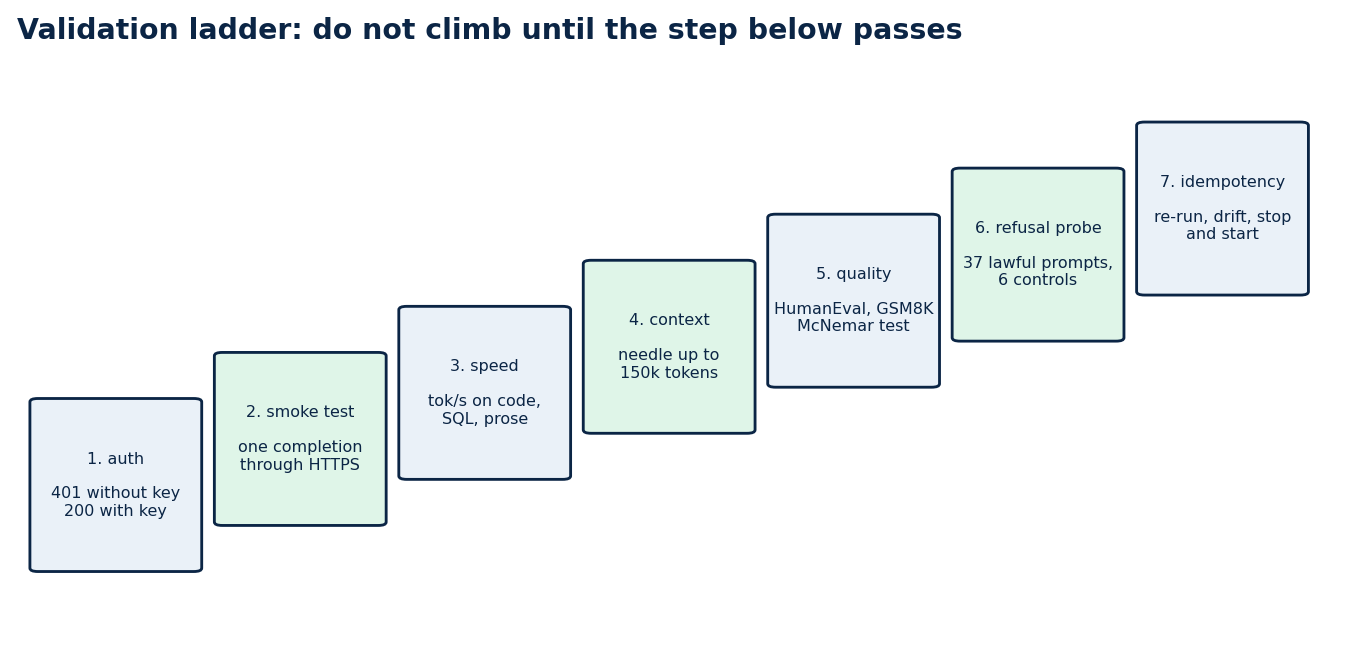 Climb in order: authentication, a completion, speed, long context, quality, refusal behaviour, rebuild. A fast endpoint that leaks is worse than a slow one that doesn't.
Step 4: make it survive a restart
A rented GPU is temporary by design: the provider can stop it, hand back a different address or a different card. If rebuilding it depends on remembering what you typed, you don't have a deployment. Four rules made this one rebuildable:
- Compare before acting. The vLLM config is a delimited block; the script builds the wanted block, reads the current one, and rewrites only on a difference.
- Downloads are no-ops when the files exist, so a restart never fetches 56 GB again.
- Never restart a server that is still loading. My first version treated "not healthy yet" as "broken" and kept killing a server that was loading its weights. It now waits for the health check and restarts only a server that never becomes healthy.
- Own the edge config in marked blocks, rewritten in place, so running twice can't duplicate a route.
Terraform here downloads no provider. Each stage is a terraform_data resource that runs a script and re-runs only when the hash of the script or its inputs changes. terraform plan -detailed-exitcode returning 0 is the first proof that nothing is left to change; the test suite in tests/idempotency.py and tests/restart_cycles.py goes further, with two hard restarts and a provider stop and start (16 of 16 steps passed, the endpoint back in seven to eight minutes each time, with no re-download).
Cost, and when to turn it off
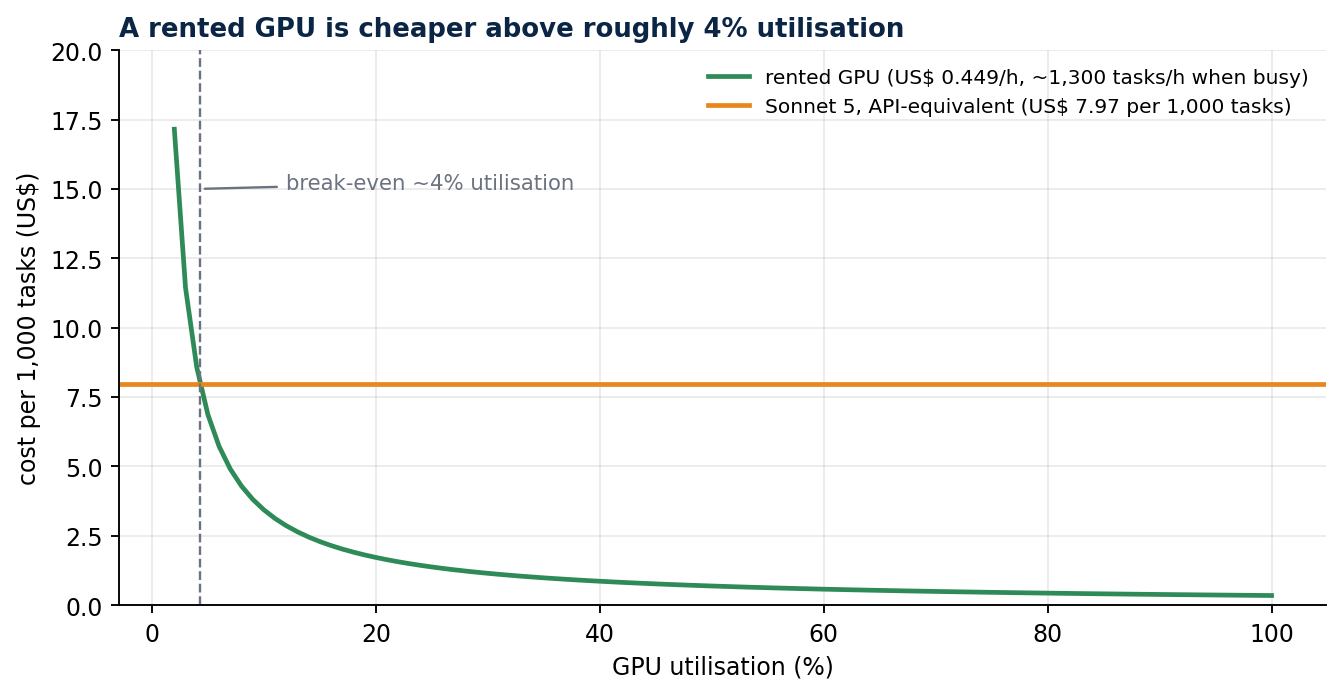 At US$ 0.449 per hour, renting beats a frontier API above about 4% utilisation of one instance and loses below it.
Stop the instance when nobody uses it. A stopped instance bills only its disk, and the endpoint returns by itself about eight minutes after a start, weights intact:
scripts/vast-power.sh stop     # needs VAST_API_KEY and VAST_INSTANCE_ID
scripts/vast-power.sh start
Never destroy it to save money: that deletes the weights, and the next start downloads 56 GB again.
Before you open it to anyone
A model that refuses less is a different thing to put on the internet. Before giving it a public URL:
- Read the model card and note what it doesn't claim.
- Check that the repository's base model matches the card, and pin the revision.
- Read both licences.
- Benchmark it on your own tasks with a grader you audited.
- Measure its refusal behaviour yourself instead of trusting the card (How to test whether an LLM really refuses less).
- Keep it behind authentication and decide, in writing, who may use it and for what.
Mistakes that cost me hours
supervisorctl stop vllmdoesn't release the port: the API server's children keep it, so the old process kept answering and a failed restart looked like a success. Check the PID or a log line after every restart.pkill -f "vllm serve"also matches the shell running it. Usepkill -f "[v]llm serve".- Two vLLM processes profiling GPU memory at the same moment miscount each other. The sidecars start only after the main model is healthy.
Limits
One GPU model, one vLLM version, one abliterated lineage. A dense 27B at FP8 is a strong general model, not a frontier model for long agentic work, and I don't claim it is.
Reproduce it
Everything above is in qwen-abliterated-api: infra/terraform-vast/ for the apply, scripts/ for the idempotent steps, tests/ for the checks, and docs/SELF_HOSTING.md for the full walkthrough. The public RAG chat on my portfolio uses this endpoint for every answer it writes.